URL stands for Uniform Resource Locator. A URL is the web address used to locate a specific resource on the internet, such as a webpage, image, video, or file. For example, https://example.com/about is a URL that tells your browser how to access a particular page.
In simple terms, a URL works like an address for online content. It tells your browser where a resource is located and how to access it. You see URLs whenever you visit a website, open a link, download a file, or share a webpage.
What URL Stands For
URL is an acronym for Uniform Resource Locator. Each word describes a specific job the address performs:
- Uniform it follows one consistent, predictable format no matter what website or system created it.
- Resource it points to something specific, such as a webpage, image, video, PDF, or downloadable file.
- Locator it tells a computer the precise location of that resource on the internet, similar to how a street address locates a building.
In plain terms, a URL is a set of directions your browser follows to find and load exactly the content you’re looking for.
What Is a URL in Simple Terms?
A URL is the address of something available on the internet. Just as a street address helps you find a particular building, a URL helps your browser find a particular webpage, image, video, or file.
For example:
This URL tells your browser several things:
- HTTPS tells it how to connect to the website.
- example.com identifies the website.
- /blog/seo-tips identifies the specific page.
When you click a link, you usually don’t need to understand these parts because your browser handles the process automatically.
You can think of a URL as a complete online address. A domain name identifies the website, while the full URL can identify a specific page or resource within that website.
The Parts of a URL Explained
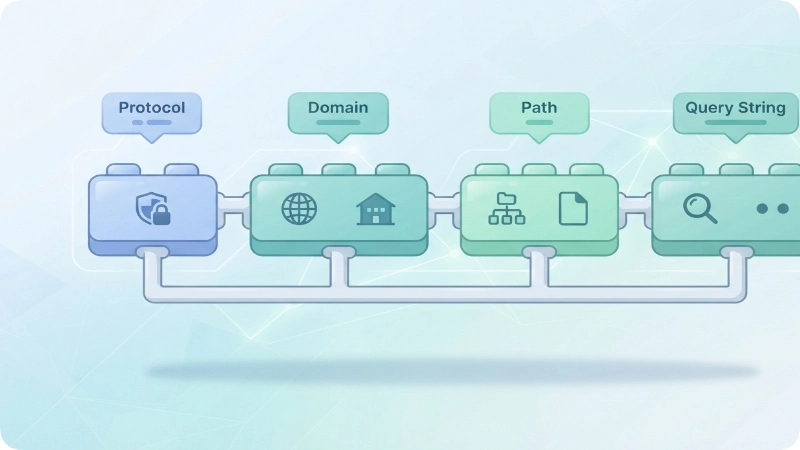
A URL can contain several different components. Not every URL uses every component, but understanding the common parts makes web addresses much easier to read.
Consider this example:
Here is what each part does:
| Part | Example | Purpose |
| Scheme | https:// | Tells the browser how to access the resource |
| Subdomain | www | Identifies a subdivision of a domain |
| Domain | example.com | Identifies the website |
| Port | :443 | Specifies a network port when needed |
| Path | /blog/seo-tips | Identifies a specific resource or page |
| Query string | ?source=email | Sends additional information to the server |
| Fragment | #title | Points to a specific location on the page |
Scheme or Protocol
The scheme appears at the beginning of a URL, such as https://. It tells the browser which communication method to use.
The most common web schemes are HTTP and HTTPS. HTTPS uses encryption to protect data exchanged between your browser and the website.
Subdomain
A subdomain appears before the main domain, such as www in:
However, www is optional. Websites can use other subdomains, such as blog.example.com or support.example.com.
Domain Name
The domain name identifies the website. In https://example.com/about, the domain is example.com.
A domain normally includes a name and a top-level domain (TLD), such as .com, .org, .net, or a country-code extension such as .uk.
Port
A port identifies a specific network service. You may occasionally see one after the domain, such as:
Most everyday URLs do not show a port because browsers use the standard port automatically.
Path
The path appears after the domain and identifies a particular resource or location on the website.
For example:
/blog/seo-tips
might point to a specific article.
Query String
A query string begins with a question mark (?) and can contain additional information sent to the server.
For example:
?category=technology
A website might use this information for searches, filters, tracking, or other functions.
Fragment
A fragment begins with a hash symbol (#) and usually points to a particular section of a webpage.
For example:
can open the page and move the browser directly to the section identified by pricing.
Not every URL contains every component. A simple URL such as https://example.com can be enough to open a website’s homepage.
URL vs. Website: What’s the Difference?
A URL and a website are not the same thing.
A website is a collection of webpages and other resources available under a particular domain. A URL is the address used to locate one specific resource.
For example:
- Website: Example.com
- Homepage URL: https://example.com
- Article URL: https://example.com/blog/seo-tips
- Contact page URL: https://example.com/contact
One website can contain thousands of URLs. Each URL can point to a different webpage, image, document, or other resource.
In simple terms, the website is the destination, while the URL is the address used to reach a particular part of it.
URL vs. URI vs. Domain Name: What’s the Difference?
URL, URI, and domain name are related terms, but they describe different things.
| Term | Meaning | Example |
| URL | Identifies a resource and provides a way to locate or access it | https://example.com/about |
| URI | A broader identifier for a resource | https://example.com/about |
| Domain name | Identifies the website or domain within a URL | example.com |
A URL is a type of URI. The term URI is broader because it identifies a resource, while a URL identifies a resource through a location or access mechanism.
A domain name is only one component of many URLs. For example, in https://example.com/products/shoes, example.com is the domain name, while the entire string is the URL.
For everyday web browsing, people normally use the term URL when they mean a complete web address.
Where the Term “URL” Came From
The concept was developed in the early 1990s by computer scientist Tim Berners-Lee, the same person credited with inventing the World Wide Web. As the web grew, there needed to be a standardized way for browsers to locate pages, images, and files scattered across different servers worldwide. The URL format became that standard, and it was later formalized through internet engineering documentation so that every browser and server could interpret addresses the same way.
This consistency is why a URL typed correctly works the same If you’re on a phone, laptop, or smart TV the “uniform” part of the name is doing real work.
HTTP vs. HTTPS in a URL
HTTP and HTTPS are communication protocols that can appear at the beginning of a web URL.
- HTTP: Hypertext Transfer Protocol
- HTTPS: Hypertext Transfer Protocol Secure
The main difference is that HTTPS uses encryption to protect information exchanged between your browser and the website. This is especially important when a page handles sensitive information such as passwords or payment details.
For example:
http://example.com
uses HTTP, while:
uses HTTPS.
HTTPS is now standard across the modern web. However, the presence of HTTPS alone does not prove that a website is trustworthy. A scam or phishing website can also use HTTPS, so you should still check the domain name carefully before entering sensitive information.
How to Read a URL Safely
Knowing how to read a URL can help you understand where a link leads and identify suspicious addresses before clicking them.
1. Check the domain name
The domain is one of the most important parts to inspect. Look carefully for misspellings, unusual words, or unexpected domain extensions.
For example, a fake website might use a domain that looks similar to a familiar brand but contains an extra word or misspelled name.
2. Look at the beginning of the URL
HTTPS is expected on modern websites, especially pages that handle sensitive information. However, HTTPS alone does not prove that a website is legitimate.
3. Read the path
The path can give you clues about the page you’re visiting.
For example:
suggests that the page is related to account support.
4. Understand the query string
Everything after ? may contain search terms, filters, tracking information, or other parameters. Long query strings are not automatically dangerous, but unfamiliar links deserve caution.
5. Be careful with shortened URLs
Services that shorten URLs can hide the final destination. If you don’t recognize the sender or weren’t expecting the link, avoid clicking it until you can verify where it leads.
The most important rule is simple: check the actual domain before trusting a link.
What Does “WWW” Stand For in a URL?
WWW stands for World Wide Web. It is commonly used as a subdomain at the beginning of a website address, such as:
Historically, www helped distinguish web services from other services running on the same domain. Today, it is optional. A website can use www.example.com, example.com, or another subdomain depending on how its owner has configured the site.
So, www is not required for a URL to work. It is simply one possible subdomain.
Common URL Mistakes and Misunderstandings
Several common misconceptions make URLs seem more complicated than they are.
URL and website are the same thing
They aren’t. A website can contain many pages and resources, each with its own URL.
“WWW” must appear in every URL
It doesn’t. Many websites work without the www subdomain.
HTTPS means a website is trustworthy
HTTPS protects the connection, but it does not guarantee that the website itself is legitimate. A fraudulent website can also use HTTPS.
A domain name is the same as a URL
A domain name is only one part of a URL. For example, example.com is the domain in https://example.com/about.
Every URL points to a webpage
Not necessarily. A URL can point to an image, video, PDF, downloadable file, API endpoint, or another type of resource.
URLs and IP addresses are identical
They are not. A URL is a human-readable address that can contain a domain name, while an IP address is a numerical network address. DNS can translate a domain name into an IP address so a browser can connect to the appropriate server.
Quick Reference Table
| Question | Quick Answer |
| What does URL stand for? | Uniform Resource Locator |
| What is a URL? | A web address used to locate a resource online |
| What does HTTP mean? | Hypertext Transfer Protocol |
| What does HTTPS mean? | Hypertext Transfer Protocol Secure |
| What does WWW mean? | World Wide Web |
| What is a domain name? | The website name within a URL |
| What is a URL path? | The part that identifies a specific resource or page |
| What does ? mean? | It begins a URL query string |
| What does # mean? | It identifies a fragment or section of a page |
| Is a URL the same as a website? | No. A website can contain many URLs |
Frequently Asked Questions
What does URL stand for?
URL stands for Uniform Resource Locator. It is the technical term for a web address that helps a browser locate and access a specific resource online.
What is a URL in simple words?
A URL is the address of something on the internet. It can point to a webpage, image, video, document, or another online resource.
What are the main parts of a URL?
A URL can contain a scheme such as https://, a subdomain, domain name, port, path, query string, and fragment. Not every URL contains all of these components.
What does HTTPS mean in a URL?
HTTPS stands for Hypertext Transfer Protocol Secure. It indicates that the connection between your browser and the website uses encryption to protect data in transit.
What does WWW stand for?
WWW stands for World Wide Web. It commonly appears as a subdomain at the beginning of a web address, although modern websites do not have to use it.
Is a domain name the same as a URL?
No. A domain name is one part of a URL. For example, example.com is the domain name in https://example.com/about.
Can a URL point to something other than a webpage?
Yes. URLs can identify or locate many types of resources, including images, PDFs, videos, downloads, and other web resources.
Can URLs contain spaces?
URLs cannot contain literal spaces in their standard form. Spaces are normally encoded when they need to be represented in a URL.
What does the question mark mean in a URL?
A question mark (?) normally marks the beginning of the query string. The query can send additional information to the server, such as search terms, filters, or tracking parameters.
What does the hashtag or # mean in a URL?
A # introduces a fragment. It can tell the browser to jump to a particular section or location within a webpage.
Key Takeaway
URL stands for Uniform Resource Locator, the technical term for an address used to locate a resource on the internet. A URL can contain several parts, including a scheme such as HTTPS, a domain name, a path, a query string, and a fragment.
You don’t need to memorize every technical component to use the web confidently. However, knowing how to recognize the domain, understand HTTPS, and read the rest of a URL can help you understand links and spot suspicious web addresses before you click them.